Uploading Images to a Softools Root Cause Analysis Record via the API

Example Business Process
There is a Third-Party software tracking Issues. When an Issue reaches the point where Root Cause Analysis (RCA) is required, speed and clarity matter. Softools provides a dedicated RCA App designed to help teams fully understand problems, identify root causes, and implement effective corrective actions.
One of the most powerful ways to improve RCA quality is by including images captured at the time the issue was identified by uploading copies of them from the third-party system when the RCA is created.
The Scenario: Root Cause Analysis in Softools
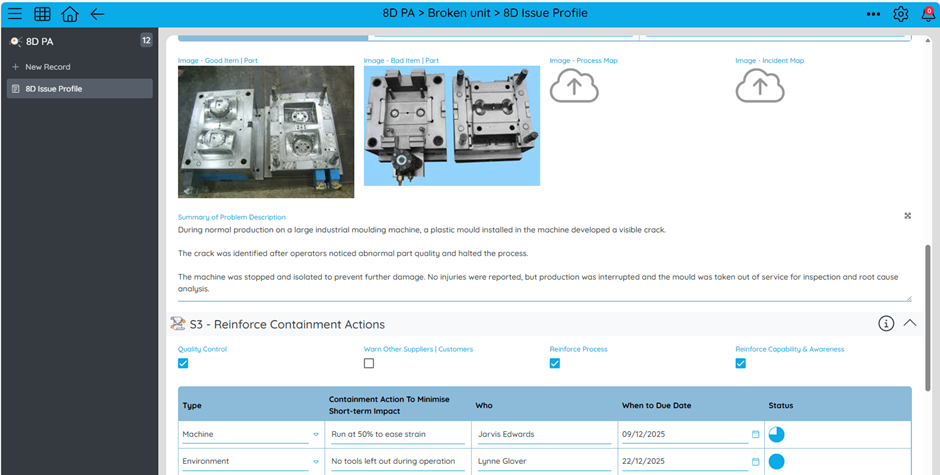
An issue is identified and meets the criteria for formal Root Cause Analysis. A Root Cause Analysis record is created in Softools, which becomes the central place for:
- Clear problem definition
- Root cause techniques
- Impact and risk assessment
- Corrective and preventive actions
- Governance, review, and sign-off
For RCA participants, especially those not present when the issue occurred, visual evidence provides immediate understanding of the problem context.
Adding Image Evidence to the RCA Record
Using the Softools Image API, images associated with the issue can be digitally transferred into the RCA record in Softools via the Softools API.
This ensures that everyone involved in the analysis is working from the same, objective evidence.
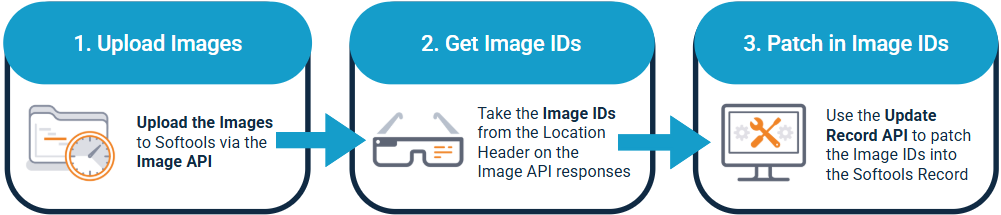
How It Works
- Images are POSTED to Softools using the Image API
- Softools returns an Image ID for each image
- The RCA record is PATCHED with the Image ID
Images appear directly within the RCA App, alongside the problem statement and analysis fields.
API Flow (Simplified)
For complete documentation on the APIs used here please consult the Softools API Documentation.
Step 1: Upload Image to Softools via the Image API
POST
https://api-gateway.softools.net/Api/Apps/{AppIdentifier}/Data/{RecordId}/Images

{
  "data": "data:image/jpeg;base64,/9j/4AAQSkZJRgABAQAAAQ...",
  "filename": "issue-evidence.jpg"
}

HEADERS
apikey: <your api key>
tenant: <your tenant>
Content-Type: application/json
Step 2: Capture the Image ID from the Location response header.
One of the Headers in the Image API response will be in the form:
{ "Location": "https://api.on.softools.net/Api/Image/6942a017932bcc998b0786c4" }
Image ID is therefore "6942a017932bcc998b0786c4"
Step 3: Attach Image to the RCA Record
Use the Softools Update Record API to patch the image IDs into the values for the Image Fields.
PATCH
https://api-gateway.softools.net/Api/Apps/{AppIdentifier}/Data/{RecordId}
{
  "problemEvidence": "6942a017932bcc998b0786c4"
}

HEADERS
apikey: <your api key>
tenant: <your tenant>
If there are multiple images then repeat Steps 1 & 2 for each image and then include all Image IDs as Image Field and Value key pairs in the JSON.
Bottom line
Root Cause Analysis in Softools is most effective when everyone shares the same understanding of the problem. By attaching image evidence to RCA records using the Softools Image API, teams gain instant clarity, conduct stronger analysis, and deliver more reliable corrective actions.
Please sign in to leave a comment.
Comments
0 comments