Using Copy & Link for Repeatable Structures in Softools (Audit & Questions Example)

When designing applications in Softools, a key principle is to avoid repeating structured data directly in the main application. This ensures solutions remain scalable, maintainable, and easy to report on.
A common mistake is building large flat forms with repeated fields such as:
- Question 1
- Question 2
- Question 3
- Question 4
While this may work initially, it quickly becomes difficult to maintain, limits reporting capability, and does not scale well as requirements evolve.
A better approach is to use a child app structure combined with Copy & Link.
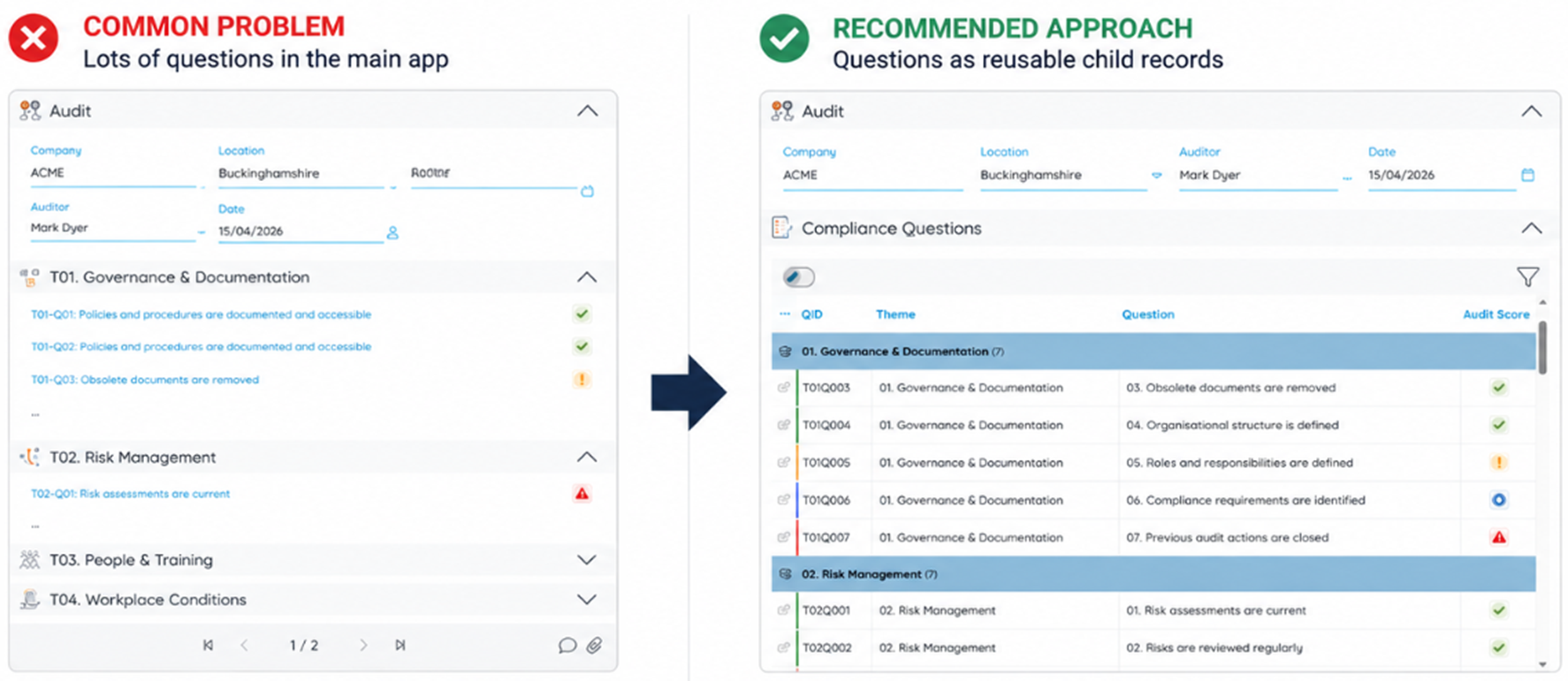
The Audit Example
Let’s use an Audit app as an example.
In most audit processes, each audit contains a list of structured questions such as:
- Policies and procedures are documented and accessible?
- Documents are within review date?
- Risk assessments are current?
- Employees are trained for roles?
You could build these as individual fields in the Audit app, but this approach becomes rigid and unmanageable over time.
Instead, we design:
- One parent Audit app
- One child Audit Questions app
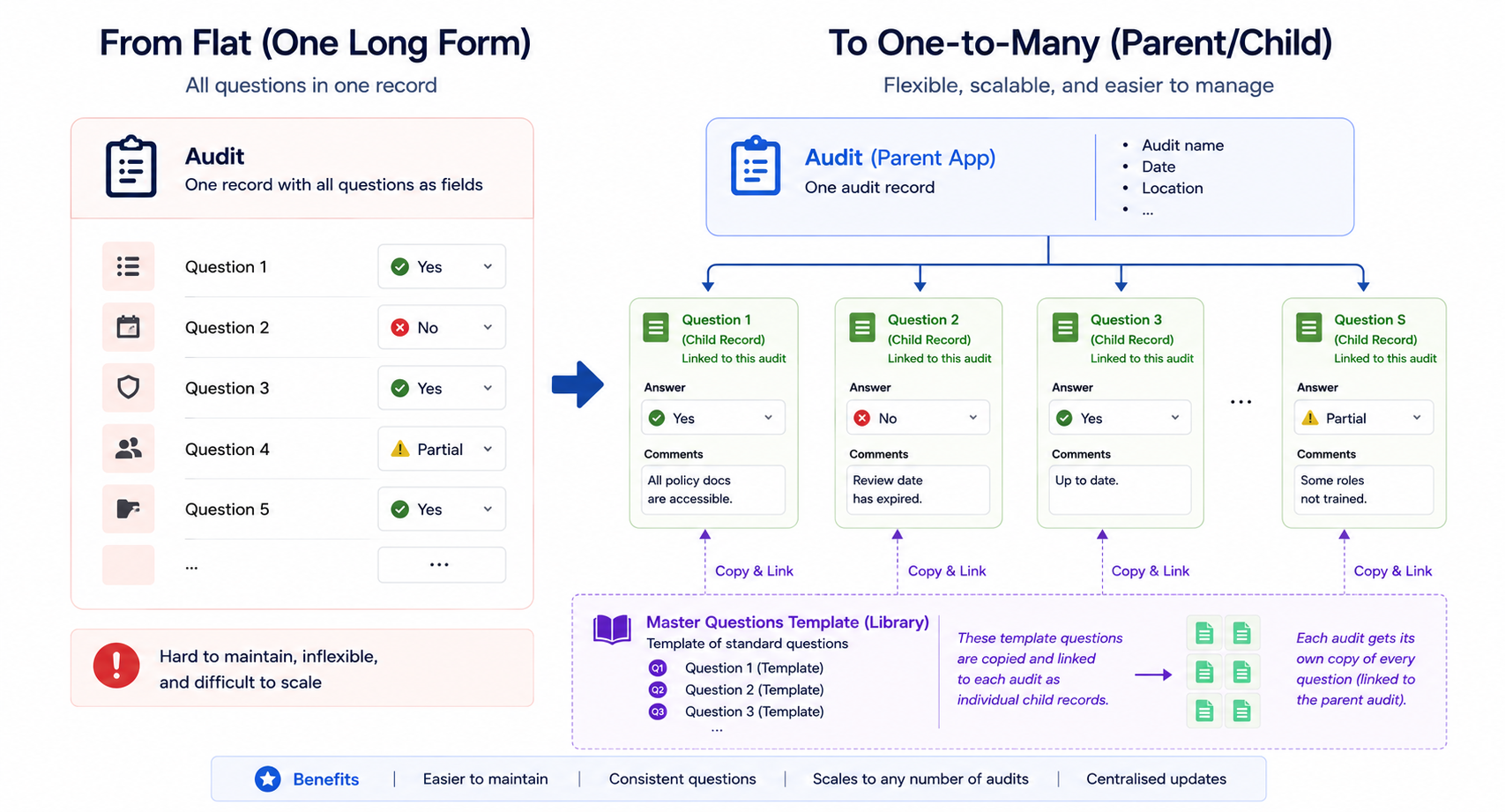
So rather than one huge form, you now have a flexible one-to-many relationship.
Creating the Master Question Set
The next step is creating a reusable master set of audit questions. Inside the Audit Questions app, a Bit field called Master is added.
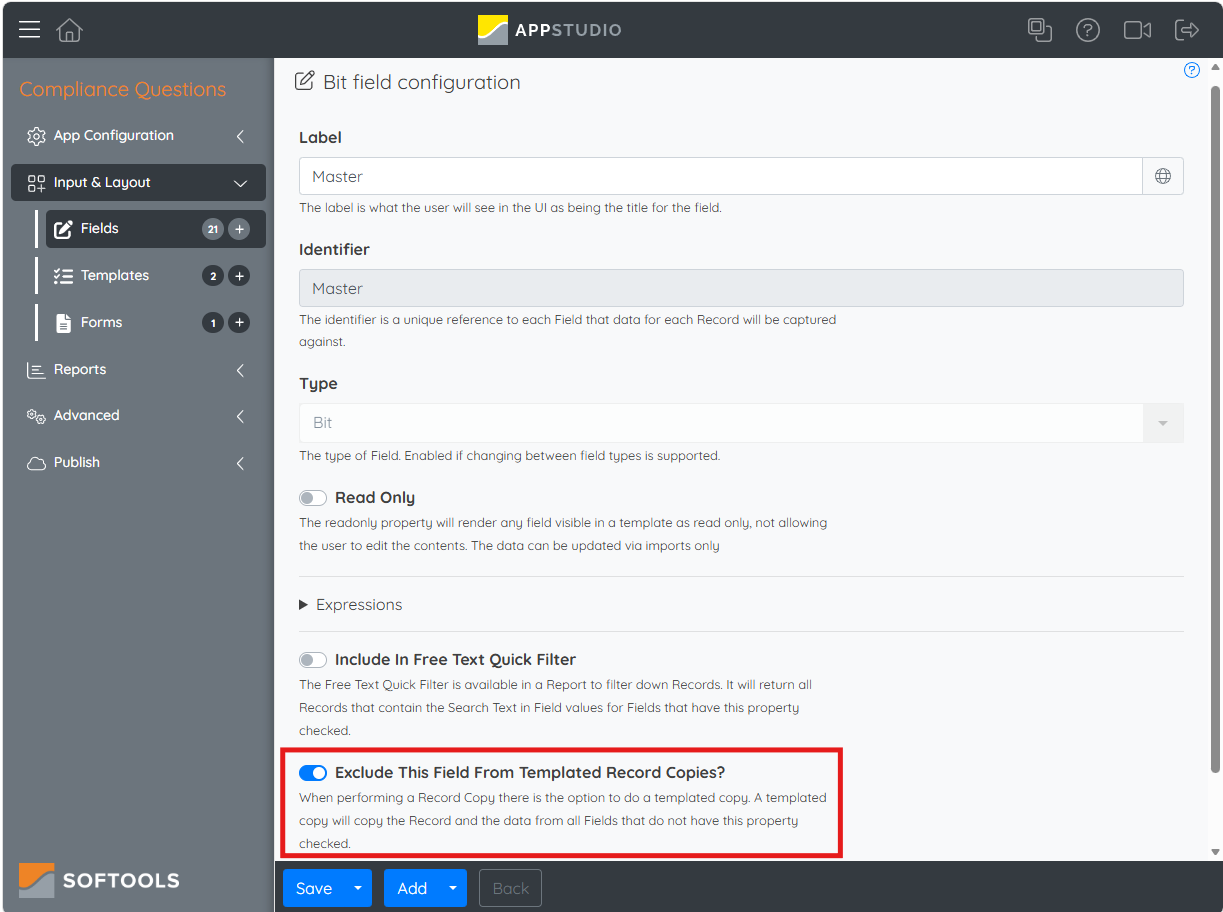
Make sure to toggle on the option for 'Exclude This Field From Templated Record Copies?' This becomes important later to ensure copied audit questions do not incorrectly retain a Master = true state.
This field is ticked for a set of master template questions that should be copied into new audits.
So, your master question records might look like this:
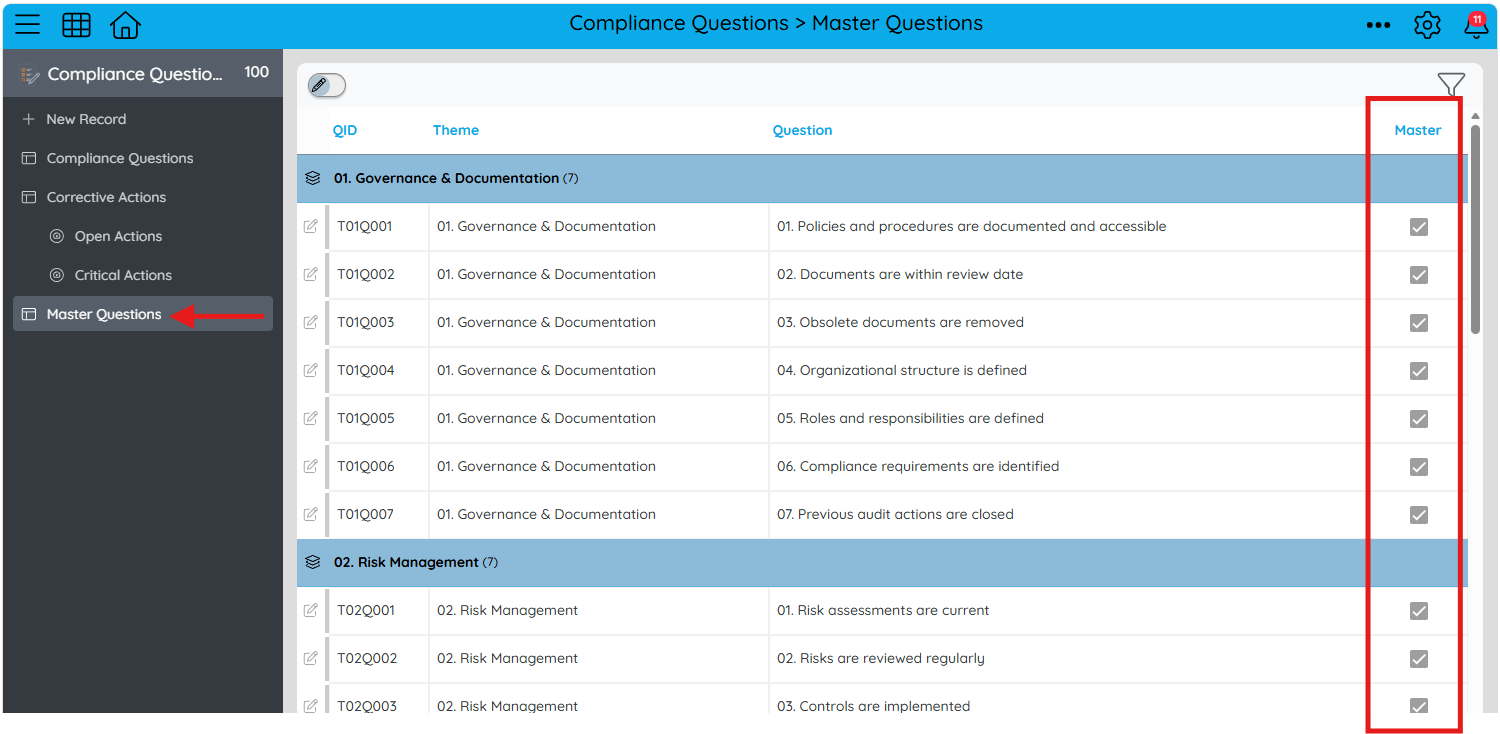
These records act as the template or blueprint for the Audit.
How the Copy & Link Workflow Works
When a new Audit is created, the User will enter the Audit specific information such as Company, Auditor, Location and Audit Date.
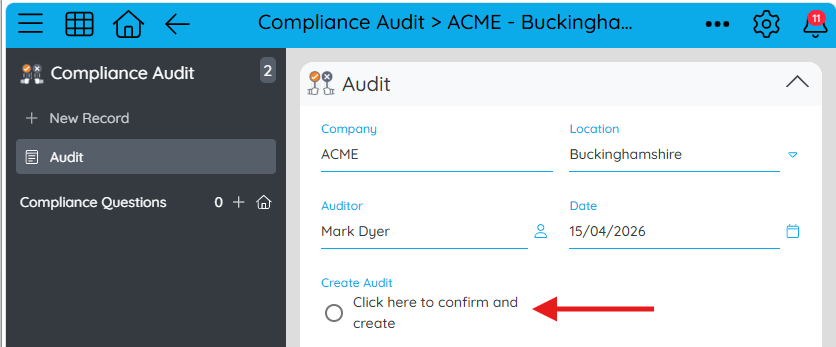
When they confirm the Audit setup and click to create the Audit, the workflow performs a copy & link.

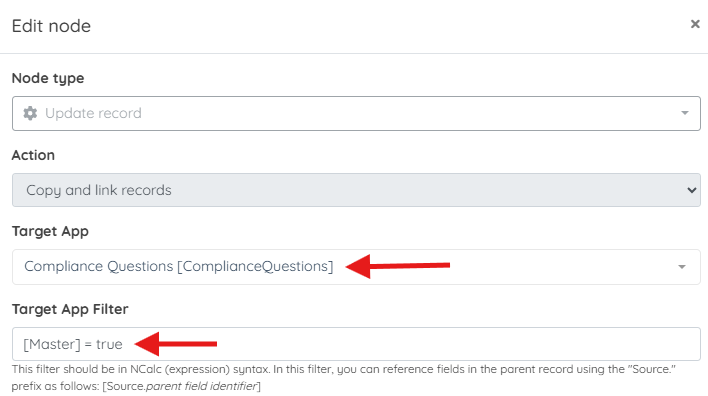
Part 1 — Copy & Link Questions
The workflow searches the Audit Questions app for records where [Master] = true
Part 2 — Why the Master Field does Not Stay Ticked
An important part of this design is that the copied records should not remain marked as master records.
Otherwise:
- The copied questions could accidentally be reused as masters
- Future audits could duplicate incorrect records
- The master record structure would become polluted
Copy & link options:
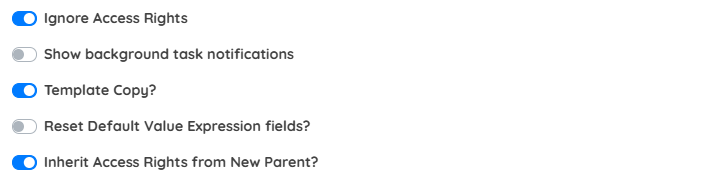
To prevent this, the Master field is configured with Exclude from Templated Copy, and the workflow has Template Copy? selected.
This means:
- The master record being copied has [Master] = true
- During the copy process, the true value is excluded
- The copied record falls back to the field default value for Master
- The default value is false
This creates brand new question records specifically for the new audit and links these to it ready to be scored.
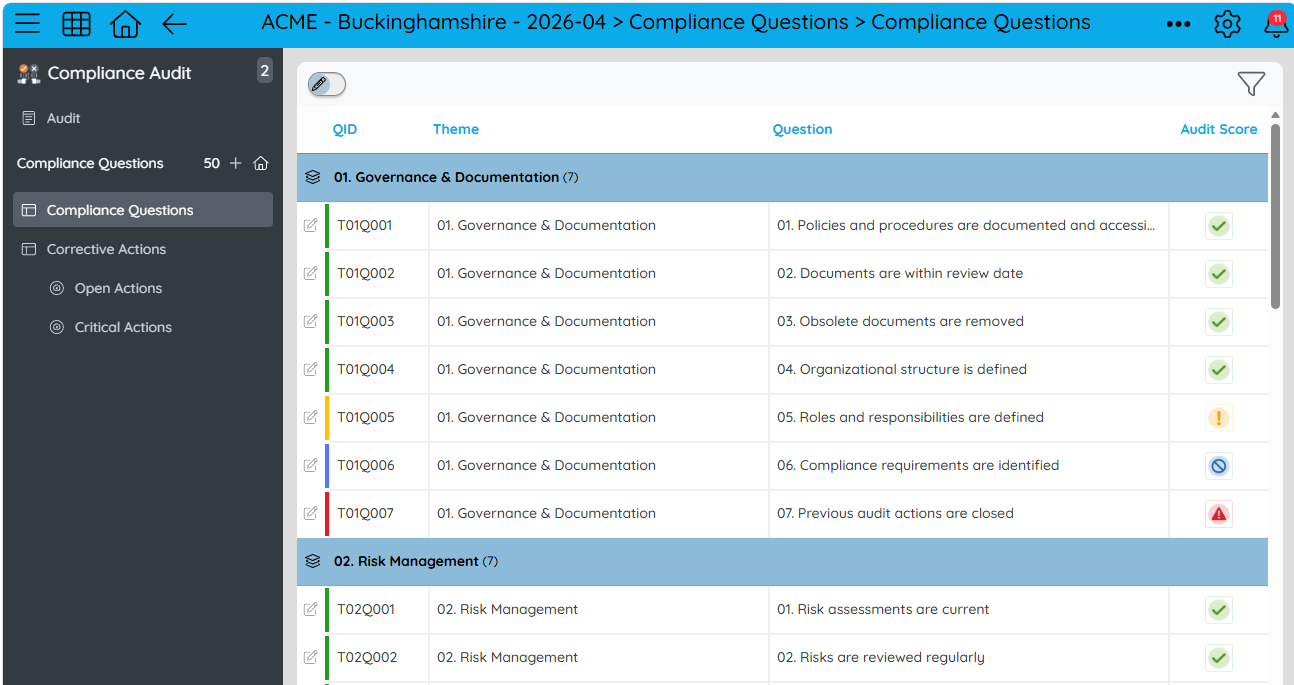
This means:
- Each audit receives its own independent set of questions
- Historical audits remain unchanged over time
- Templates can evolve without impacting past audits
- Data integrity is preserved across all audits
Access Rights and Security Considerations
When configuring the workflow:
- Ignore Access Rights ensures the system can access master templates during copy
- Inherit Access Rights from New Parent ensures copied questions follow the audit’s permissions
This allows:
- Templates to remain restricted (admin-only if required)
- Copied questions to be visible and editable within the audit context
Embedding Questions in the Audit App
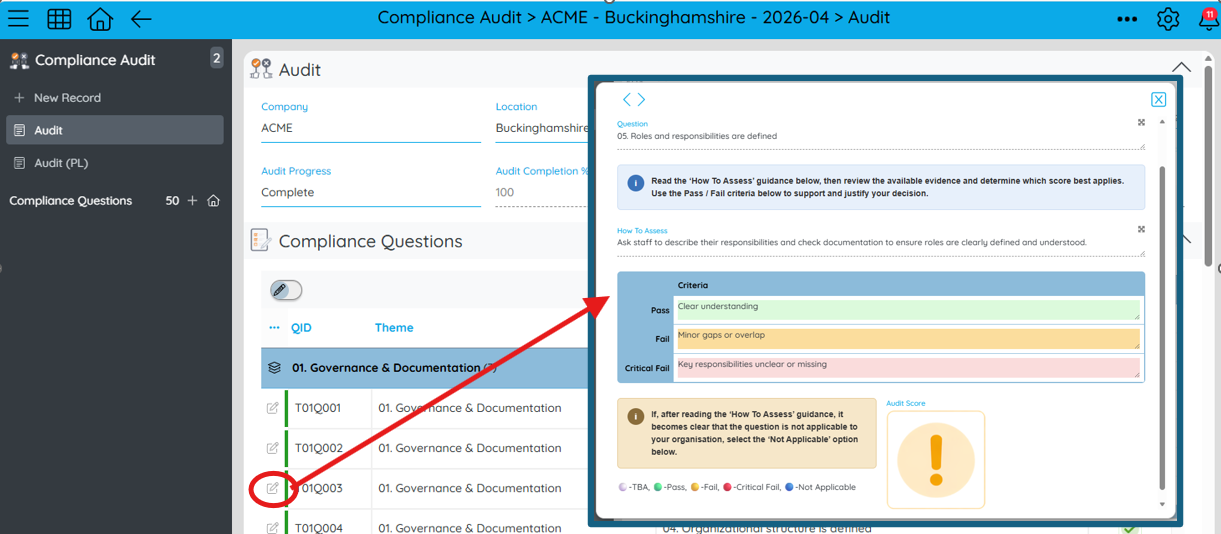
For seamless navigation, we recommend embedding the Question Report into the main Audit App and enabling a popup to score the questions. This acts to better keep the User in the context of the Audit when completing the Audit questions.
Why Child Records Are So Powerful
Another major advantage of this design is flexibility.
Once each question becomes its own record, you can store much richer information against it.
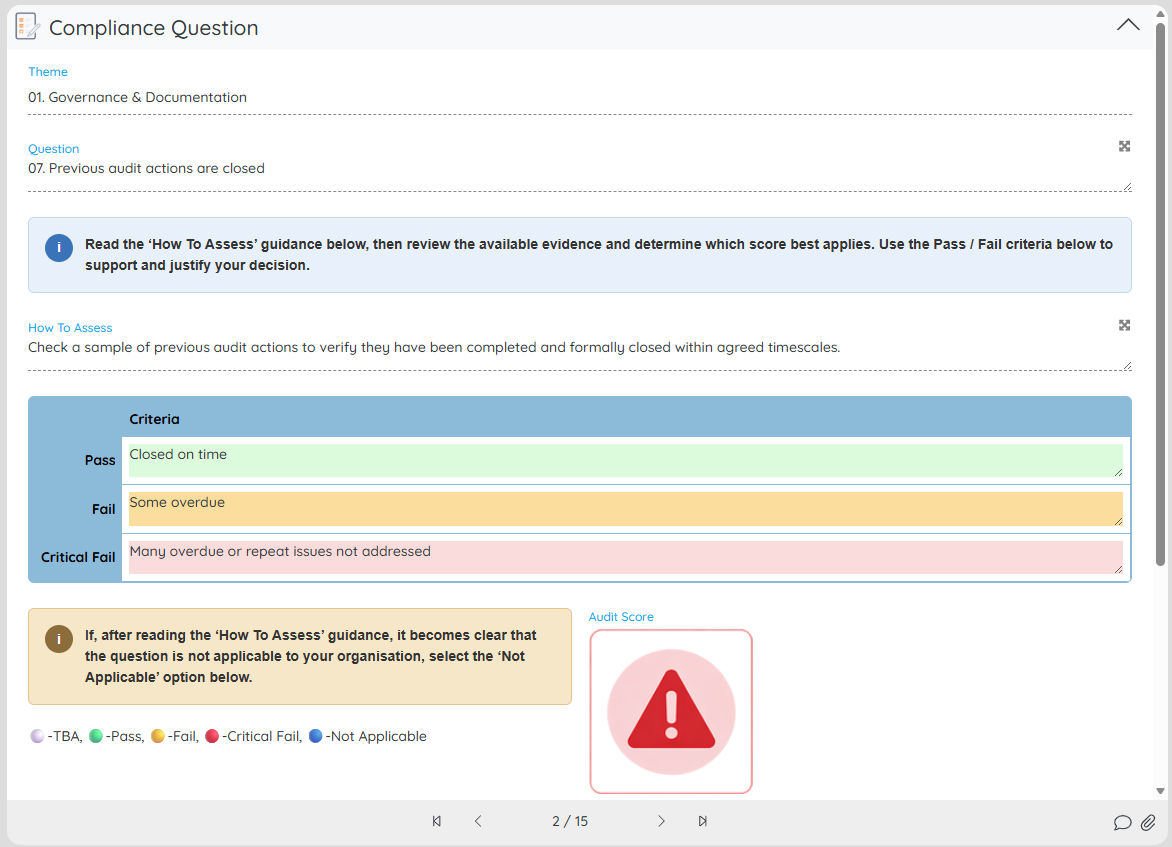
For example, each Audit Question record could contain:
- The question itself
- The score
- Guidance notes
- Evidence uploads
- Corrective actions
- Due dates
- Ownership
- Escalation status
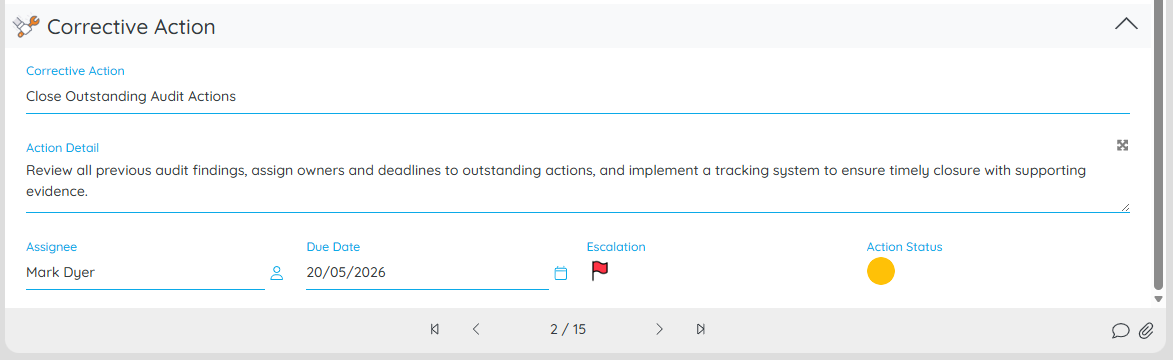
Instead of trying to force all of that into a flat audit form meaning each feature is duplicated for each question, here each question becomes a fully functional object within the system.
Reusable Workflow Logic
Another big benefit of this audit structure is workflow reusability.
Imagine you want an escalation process whenever a failed question's action needs input.
If questions were simply fields inside the Audit app, you need one workflow per question. That quickly becomes difficult to maintain.
But when every question is its own child record, you only need one workflow. That workflow can operate across all questions.
“If an action requires input, set the escalation flag to Red, triggering the escalation workflow.”
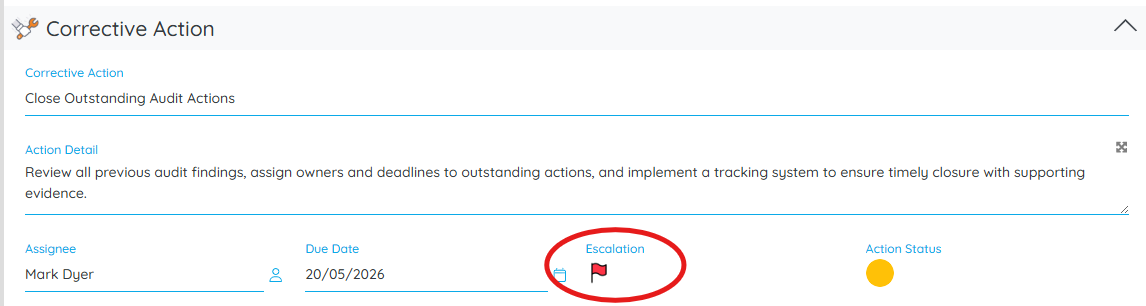
The same workflow now works universally across all audit questions.
This dramatically reduces complexity and makes the solution much easier to scale and maintain.
Easier Reporting and Scorecards
This structure also makes reporting significantly easier.
Because every question is stored as an individual record, Softools reports can analyse audit results far more effectively.
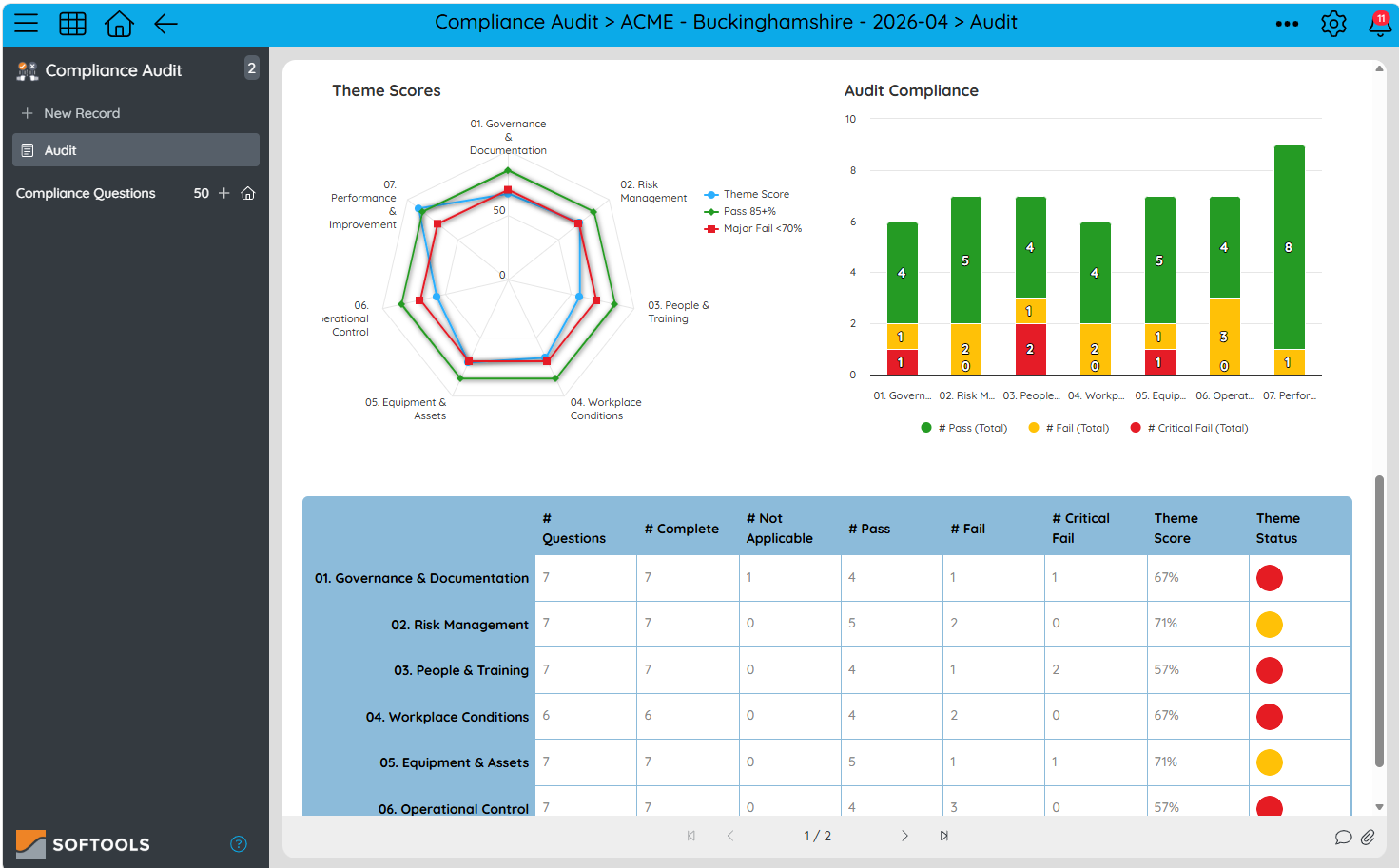
These types of reports can either be built in the Child App and embedded into the Main Audit App, or a Grid Field can aggregate the Question Data to use as an in-app data source for the reports to be built in the Audit. The former allows for:
- Dynamic theme names if there are multiple audit types
- If changes in audit structure are likely over time.
Because each question is a separate record, the reporting engine can also filter the Records out of Reports. Here we have an embedded table report of Audit Questions that have failed and require action with what the remedial action is:
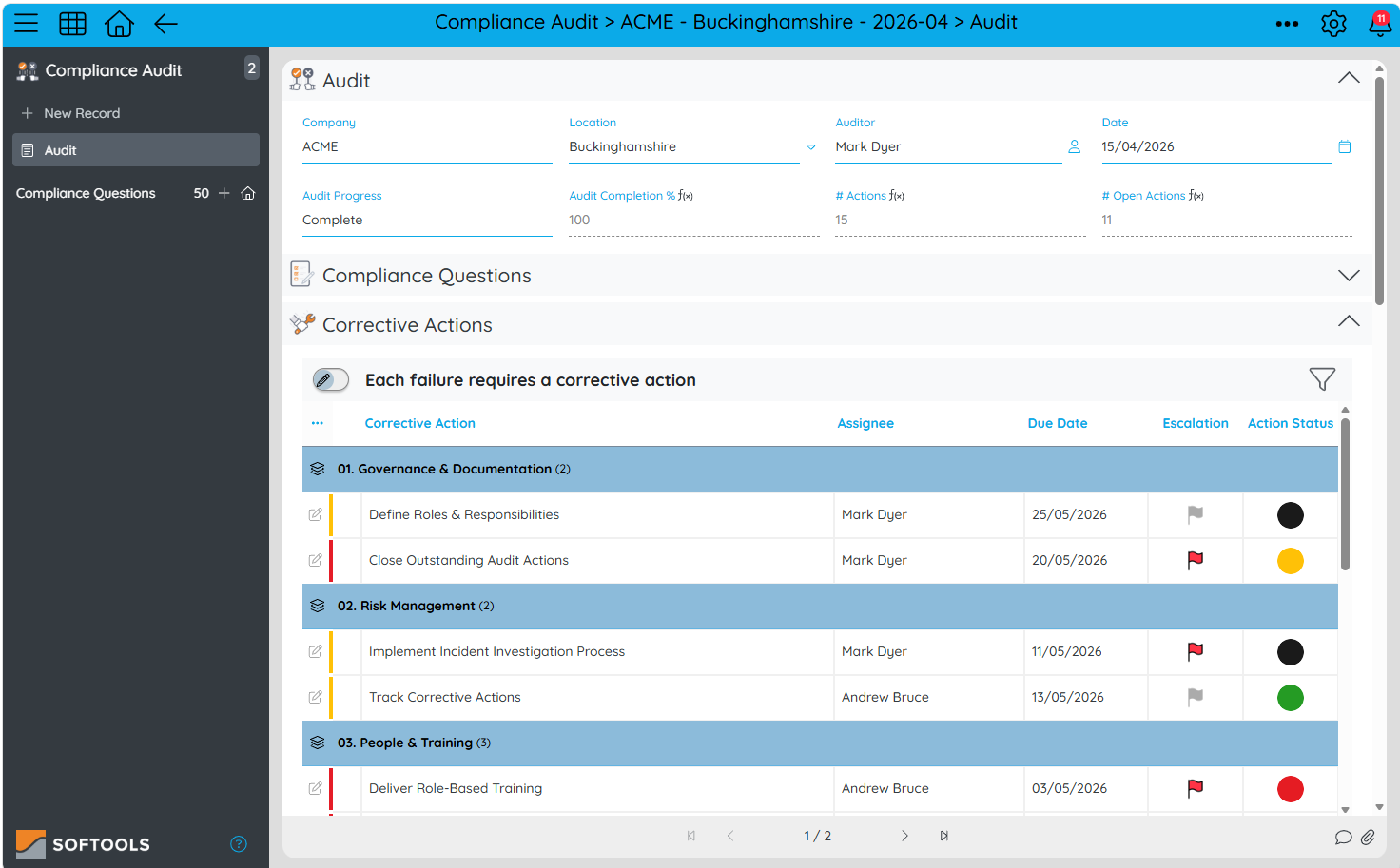
This is one of the key reasons why scalable applications use hierarchal Parent and Child App structures rather than large flat forms in one App.
The General Design Principle
A good rule in Softools is:
If data repeats in a structured way, it probably belongs in a child app.
Examples include:
- Audit questions
- Inspection checklist items
- Project milestones
- Meeting agenda items
Whenever you see repeating rows of information, think:
“Should this be a child app with Copy & Link?”
Usually, the answer is yes.
Summary
Using child apps together with Copy & Link workflow creates applications that are:
- Highly scalable
- Easy to maintain
- Reporting-friendly
- Structurally consistent
- Reuseable across multiple processes
The core pattern is:
- Create a child app for repeatable structures
- Define a master record set or sets
- Use Copy & Link to generate linked child records
- Ensure master records remain separate from live data
This approach forms the foundation of scalable application design in Softools.
Please sign in to leave a comment.
Comments
0 comments