Why Every Softools App Should Have a Structured Unique Record ID

When building applications in Softools, whether it’s a Projects App, Assessments App, or KPI App, one of the most valuable early design decisions is to introduce a Unique Record ID for every record.
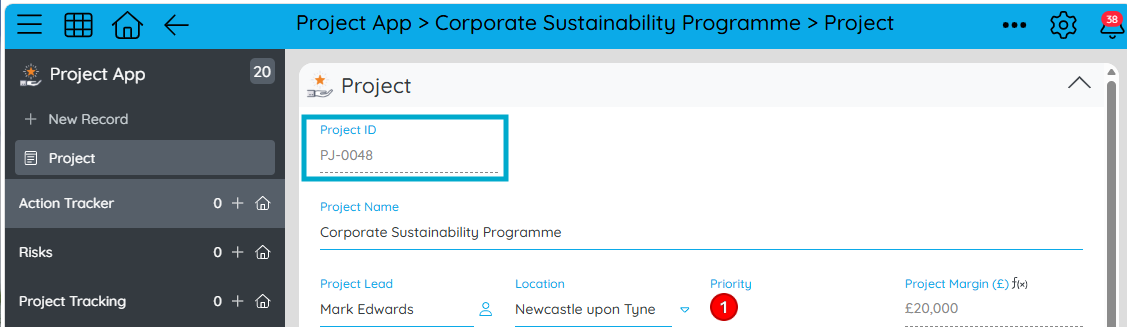
Although it may seem like a small configuration step, it has significant long-term impact on integration, reporting, usability, and data governance.
Why Add a Unique Record ID?
1. Stable Reference for Integrations (Critical)
One of the most important reasons to implement a Unique Record ID is to support reliable third-party integrations.
External systems should not rely on internal database identifiers or UI-generated references, as these can change or lack meaning outside the platform.
A structured ID such as:
PJ-0001
ASM-0042
KPI-0108
provides a consistent, portable reference that can be safely used across:
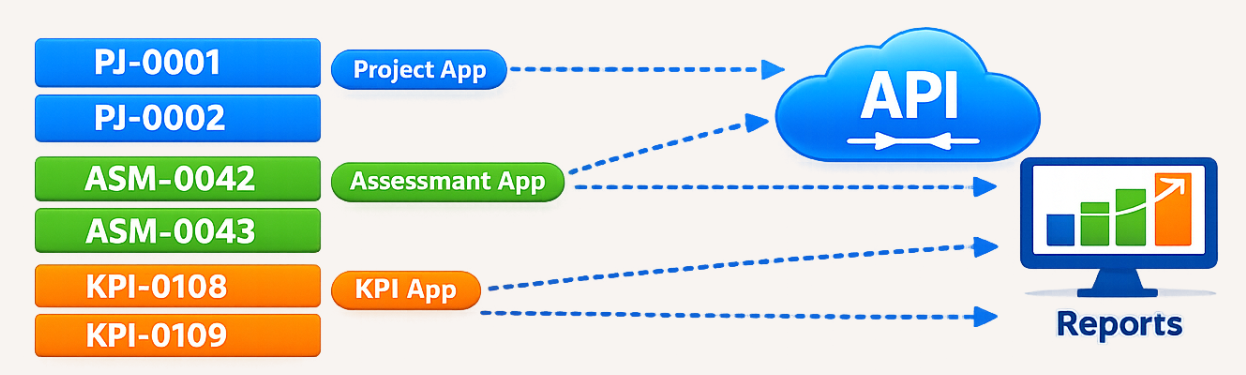
- APIs
- Data exports and imports
- Reporting platforms (e.g. Power BI, Tableau)
- Middleware or integration services
Without a stable identifier, integrations become fragile and harder to maintain over time.
2. Clear and Unambiguous Record Traceability
A Unique Record ID gives every record a clear identity that remains constant throughout its lifecycle.
This is especially useful for:
- Audit trails
- Support conversations
- Operational reporting
- Cross-team communication
Instead of relying on vague references such as “the third record” or “that assessment from last week”, users can refer directly to:
COM-0003This removes ambiguity and improves clarity across teams.
3. Faster Internal Referencing in Day-to-Day Use
In practical terms, Unique Record IDs make everyday app usage more efficient.
Users and administrators can quickly:
- Search for records
- Reference items in emails or meetings
- Navigate large datasets
- Communicate about specific entries without confusion
It becomes a shared shorthand across the organisation, improving operational speed and reducing miscommunication.
4. Improved Reporting and Sorting Behaviour
When formatted correctly, Unique Record IDs improve the usability of Table Reports.
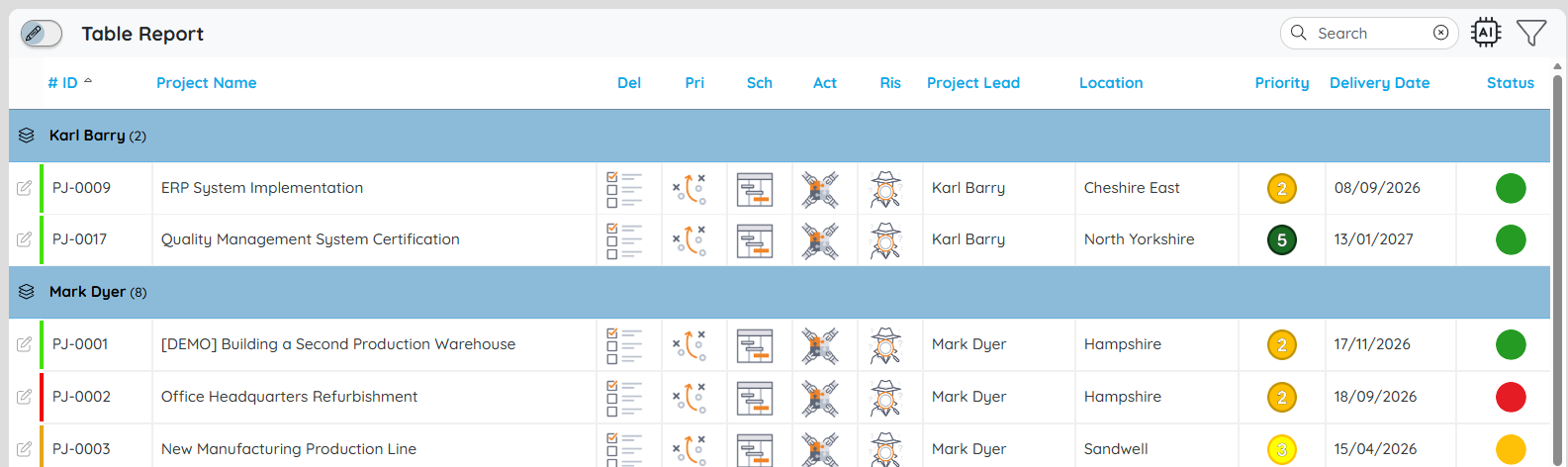
Because the IDs are sequential and consistently structured, they sort naturally in order within a grouping:
PJ-0001
PJ-0002
PJ-0003
This avoids issues such as:
PJ-1
PJ-10
PJ-11
PJ-2
Leading zeros ensure alphabetical sorting aligns with numeric ordering, making reports easier to interpret and audit.
5. Stronger Data Governance and Auditability
A consistent record reference supports better data control by enabling:
- Tracking record creation volume over time
- Easier reconciliation between systems
- Structured audit processes
- Consistent reporting across environments
It becomes a foundational element of good data governance within an application.
6. Cross-App Referencing in Multi-App Solutions
In many Softools implementations, solutions are built across multiple apps (e.g. Projects, Assessments, KPIs).
A Unique Record ID enables consistent referencing across these apps, supporting:
- Parent/child relationships
- Workflow tracking across systems
- End-to-end process visibility
For example:
- Project → linked Assessments → linked KPIs
Without a consistent reference, building these relationships becomes more complex and less reliable.
The Standard Implementation Approach
Step 1: Create an Autonumber Field
The most common approach is to add a field called:
AutonumberEnable the AutoNumber feature, which automatically generates sequential values:
- First record → 1
- Second record → 2
- Third record → 3
Step 2: Format the Unique Record ID
To make the identifier more useful, we typically add:
- A prefix (to identify the App)
- Leading zeros (for consistent formatting and sorting)
For example, in a Projects App:
[UniqueRecordID] =
'PJ-' +
if([Autonumber] < 1000, '0', '') +
if([Autonumber] < 100, '0', '') +
if([Autonumber] < 10, '0', '') +
string([Autonumber])
This produces:
PJ-0001
PJ-0002
PJ-0003
Choosing the Right Number Format (Important Consideration)
When defining the format, it is good practice to consider the expected lifetime and scale of the application, not just immediate requirements.
Although the format can be changed later, doing so may introduce inconsistency across:
- Historical records
- Reports
- Integrations
- User documentation
Recommended Approach
Choose a format that comfortably supports future growth:
| Format | Capacity |
|---|---|
| PJ-0001 | up to 9,999 records |
| PJ-00001 | up to 99,999 records |
| PJ-000001 | up to 999,999 records |
In most cases, it is better to include slightly more leading zeros than you think you will need, to ensure long-term consistency.
A More Flexible Approach: Using autoNumber()
Softools also provides a more advanced expression-based method using:
autoNumber('FieldID')Unlike a standard autonumber field, this function generates sequential numbers that can be grouped by a field value, allowing independent numbering sequences within the same app.
Example: Assessment Types
Consider an Assessments App with an Assessment Type field:
Compliance
Compliance
Performance
Risk
Compliance
Using:
[AssessmentTypeID] = autoNumber('AssessmentType')Results in:
| Assessment Type | AssessmentTypeID |
| Compliance | 1 |
| Compliance | 2 |
| Performance | 1 |
| Risk | 1 |
| Compliance | 3 |
Each category maintains its own independent sequence.
Building a Structured Unique Record ID
We can then combine this grouped numbering with formatting logic:
stringLeft([AssessmentType], 3) +
'-' +
if([AssessmentTypeID] < 1000, '0', '') +
if([AssessmentTypeID] < 100, '0', '') +
if([AssessmentTypeID] < 10, '0', '') +
string([AssessmentTypeID])
This produces:
Com-0001
Com-0002
Per-0001
Ris-0001
Com-0003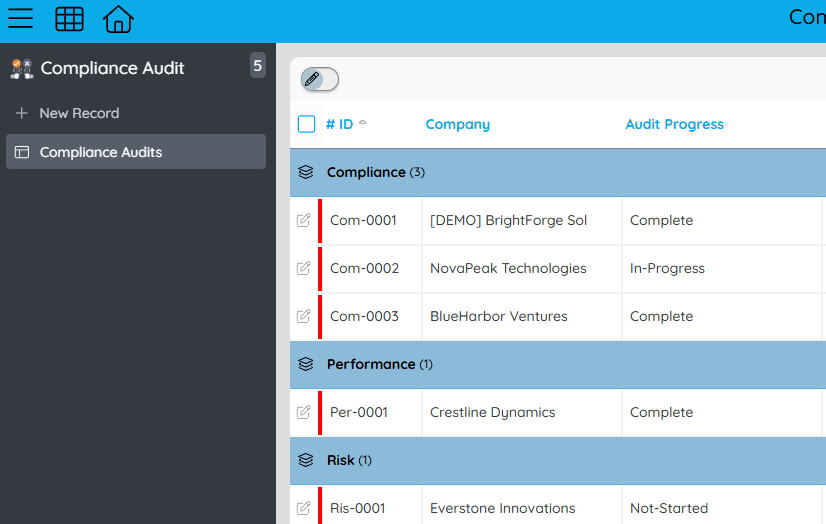
Summary
Adding a Unique Record ID in Softools is a foundational design decision that delivers long-term value across almost every aspect of an application.
It provides:
- Stable identifiers for integrations
- Clear traceability across the system
- Faster internal referencing for users
- Improved reporting and sorting behaviour
- Stronger governance and audit capability
- Easier cross-app relationships in multi-app solutions
While the implementation is straightforward, the impact is significant. Taking the time to design a consistent, scalable format—including appropriate leading zeros and thoughtful structure—ensures your applications remain robust, understandable, and integration-ready as they grow.
Please sign in to leave a comment.
Comments
0 comments