Better Data, Clearer Ownership and Faster Records with Default Values

Prepopulate information your app can already predict.
Good application design is not only about capturing the right information. It is also about making that information as quick and easy as possible for users to provide.
If a value will usually be the same, can be determined from the context or is already known by the app, consider setting it automatically rather than asking the user to enter it every time.
Appropriate default values can make records quicker to create, reduce confusion and help build a more complete and consistent dataset.
A Practical Example: Creating an Action
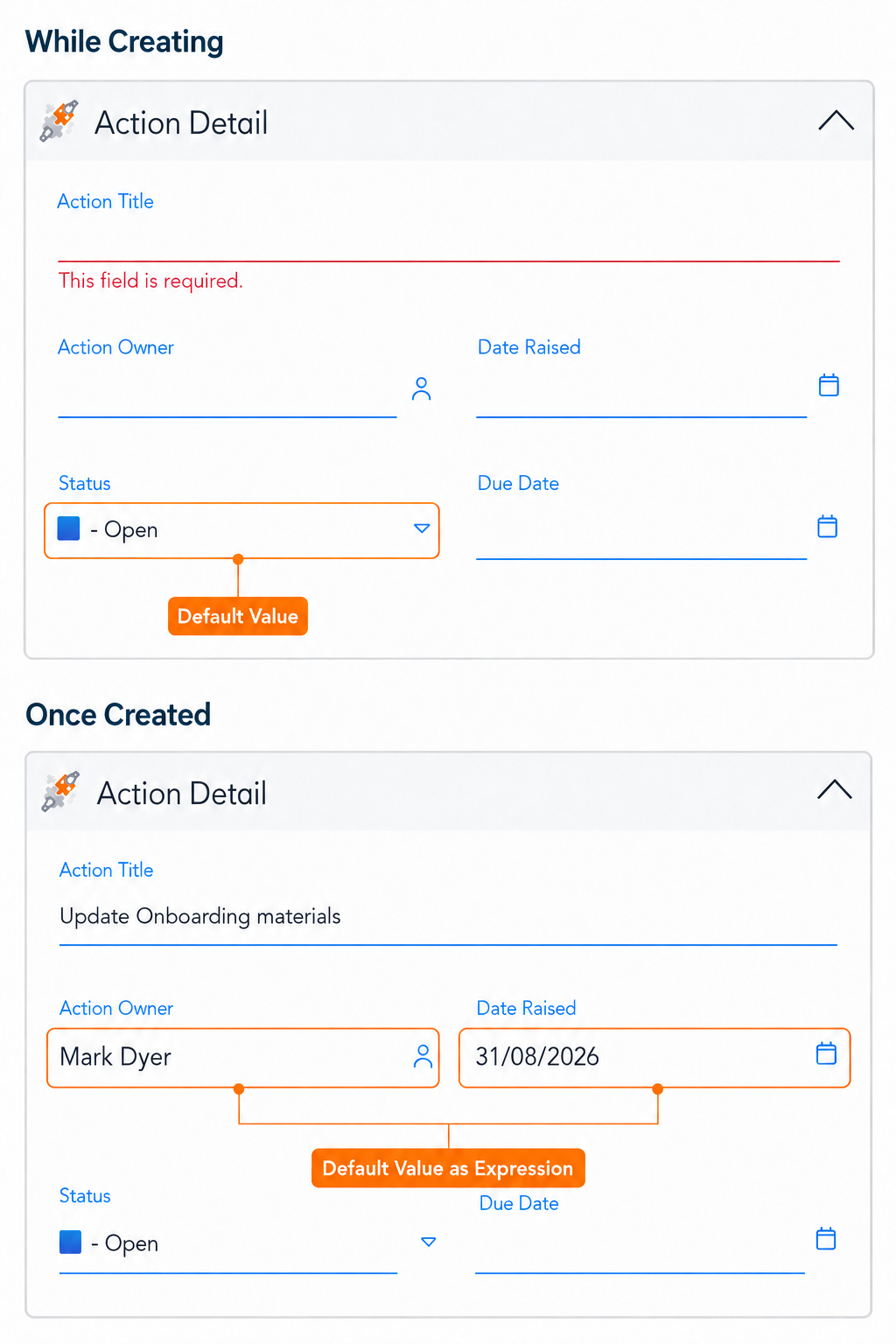
When a user creates a new action, the app could automatically:
- Set the Status to “Open”
- Assign the action creator as the Action Owner
- Set the Date Raised to today
The user can focus on describing what needs to be done while the app completes the predictable information for them.
These values remain editable, so users can change them whenever the circumstances are different.
Two Ways to Set Default Values
There are two common ways to set default values in Softools. The right option depends on whether the value should appear while the user is creating the record or be applied when the record is created.
1. Default Value
A Default Value pre-sets a fixed value while the user is creating the record.
This is most useful when a field should usually begin with the same value. For example, every new action could initially have a Status of “Open”.
The value is visible immediately and can still be changed if another option is more appropriate.
Typical uses include:
- Setting the initial status of a record
- Selecting the most commonly used category
- Applying a standard priority or classification
- Preselecting a common choice
2. Default Value As Expression
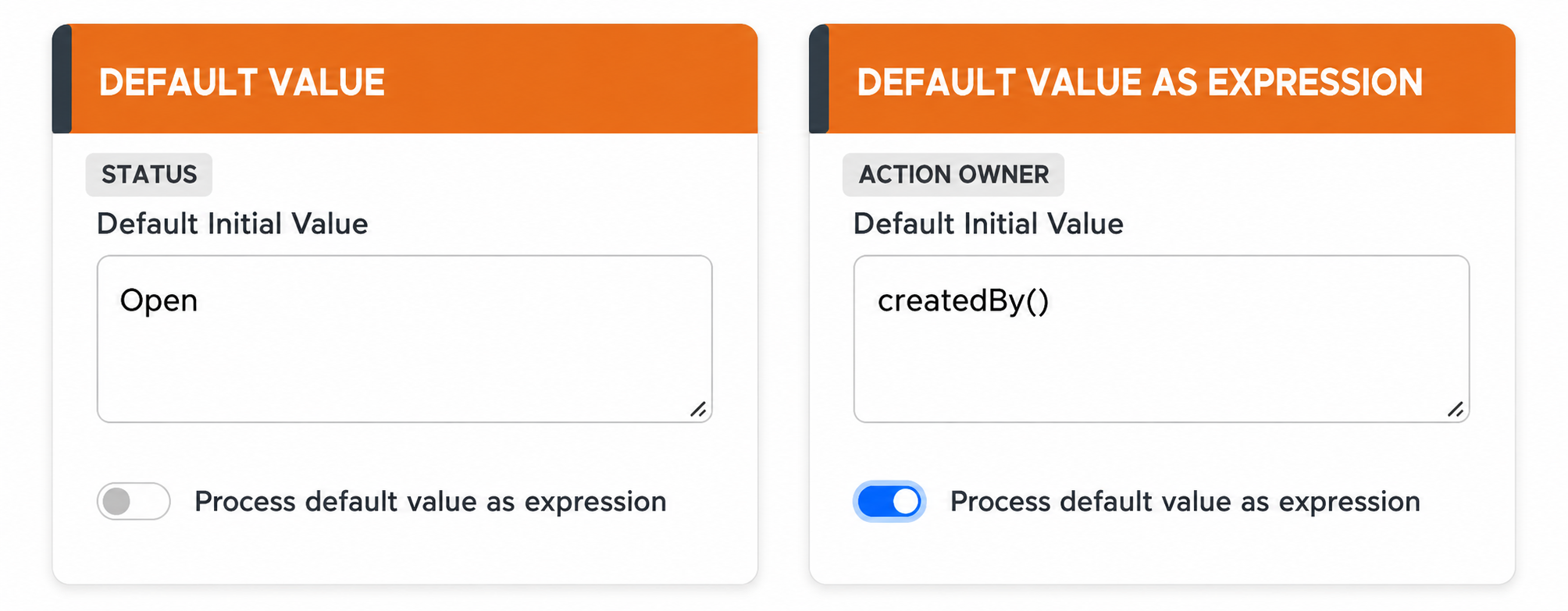
When Process default value as expression is enabled, Softools evaluates the default as an expression when the record is created, provided the user has not already entered a value.
This is useful for dynamic values that depend on the user, the current date or other information available when the record is created.
For example:
-
createdBy()could assign the person creating an action as the Action Owner - A date expression could set the Date Raised to today
- An expression could calculate an initial due date
- A value could be taken from another field on the record
Because the expression runs only when the field does not already contain a value, it can provide a helpful fallback without replacing information the user has deliberately entered.
Choosing the Right Method
A useful way to decide between the two options is to ask:
- Should the user see the value while completing the new record? Use a Default Value.
- Does the value need to be calculated when the record is created? Use Default Value As Expression.
In the action example, Status = Open is a suitable Default Value because it is a fixed starting point that can be shown immediately.
The Action Owner and Date Raised are better suited to expressions because their values depend on who creates the record and when it is created.
Save Time and Reduce Repetitive Input
The most immediate benefit of defaults is that users have fewer fields to complete manually.
Entering the same status, owner, date or team on every record adds unnecessary effort. Individually, each selection may take only a few seconds, but that effort quickly adds up across frequently used apps.
Automatically completing predictable information allows users to focus on the details that require their knowledge or judgement.
Reduce Confusion and Input Errors
Defaults can also make it clearer what a field is expected to contain.
When creating a new action, a user may not know whether its initial status should be Open, Under Review or Draft. Providing the appropriate default removes that uncertainty and gives everyone the same starting point.
This helps reduce errors caused by users:
- Selecting the wrong initial value
- Interpreting a field differently
- Typing information that the app can determine more reliably
- Leaving a field blank because they are unsure what to enter
Defaults provide guidance without adding more instructions to the template. As the values remain editable, users can still change them when an exception applies.
Improve Ownership and Accountability
Automatically assigning an owner can make responsibility clear from the moment a record is created.
For example, setting the action creator as the Action Owner prevents a new action from being created without anyone responsible for progressing it. If ownership needs to move to someone else, the value can still be updated.
Combining a clear owner with an initial status and date raised also makes it easier to see:
- Who is responsible for the action
- When the action was raised
- Where it currently sits in the process
- Which actions require attention or follow-up
This supports better accountability and reduces the risk of actions becoming unassigned or difficult to track.
Create More Complete Data for Reporting
Defaults do more than improve the experience of creating a record. They also improve the quality of the data available afterwards.
Missing values can weaken reports and dashboards. Actions without an owner may be excluded from workload reports, while missing dates can make it difficult to analyse trends or monitor performance over time.
By automatically populating predictable information, your app builds a more complete and reliable dataset. This makes it easier to:
- Group and filter records accurately
- Track actions by owner, status or date
- Identify trends and recurring issues
- Create meaningful charts and dashboards
- Make decisions using a representative set of data
A report is only as useful as the information behind it. Reducing gaps gives reports a stronger dataset to work from and makes their results more dependable.
Support User Onboarding and Adoption
Defaults can provide a small but useful benefit when introducing users to an app.
New users do not need to understand every field or process decision before creating their first record. Sensible starting values guide them through the intended process and reduce the number of choices they need to make.
By removing repetitive steps and making records easier to complete, defaults can also help the app feel simpler and more intuitive. This supports user confidence and encourages consistent use.
Keep Defaults Appropriate
Defaults should support users rather than make assumptions that are frequently incorrect.
Choose values that represent the most likely or appropriate answer, and make sure automatically populated information remains visible and editable. If users regularly need to change a default, that may be a sign that the value is not suitable or that the app needs to consider additional context.
Used thoughtfully, default values give users a helpful starting point, reduce uncertainty and make records quicker to create. They also strengthen ownership, improve data quality and give your reports a more complete and consistent dataset to work from.
Please sign in to leave a comment.
Comments
0 comments