Softools - MS Teams Solution

Integrating the world’s most advanced web application platform with the leading business web conferencing solution provides the opportunity to digitise not just individual business processes but entire ways-of-working, resulting in performance and productivity gains focused around the fundamental building block of businesses – TEAMS.
BUSINESS CONTEXT
The recent economic crisis has forced corporations to adopt modern web conferencing technologies to enable a more flexible approach team communications, reduced need for travel and a WFH – work-from-home approach to business.
Corporates who are already consumers of the Microsoft 365 suite are turning to MS Teams as their default web conferencing platform in large numbers. This provides great features out-of-the-box for team communications – inhouse or over the secure web, as well as the ability to set up ‘Channels’ focused on functions or business processes where team documents can be accessed, and ideas shared in Wikis.
Corporates looking to ‘Digitally transform’ core business processes are also turning to Softools as the global technology leader in the web platform space to address the issue of ‘Shadow-IT’ or grey-IT, where literally 1,000s of business processes are running in Excel or third-party apps that are not on the radar of the IT team. Softools provides 100s of off-the-shelf apps or enables business process apps to be built in hours without the need for coding, which are instantly deployed on a secure and scalable web platform, and where apps are immediately available on any device and that can operate in an offline mode.
Linking these two sector-leading solutions together delivers a complete solution for Teams to learn, operate, communicate and grow in a way that reflects best industry practices and provides the Executive team with the visibility and control they need.
CORE FEATURES
MS Teams delivers:
-
The leading business web conferencing capability for teams
-
A dynamic chat facility for capturing thoughts and ideas
-
Use of Wikis for access to access to knowledge, User Guides, and discussion forums
Softools delivers:
-
Consistent adoption of best practice processes across all Teams / Channels in the business
-
Real-time reporting and escalation of performance to Executive decision-makers
-
An ability to integrate with Enterprise Systems and present data in charts, dashboards or Power-BI
-
A workflow engine that triggers escalations, drives activities and keeps processes moving
-
An ability to work on any device (the platform is fully responsive) and in an offline mode
-
Elimination and avoidance of Shadow-IT – where use of Excel for business processes presents a major risk
IMPLEMENTATION
Set-up and configuration is quick – a couple of days, does NOT require coding, and would include the following steps:
-
Agree Team / Channel structure and alignment with Apps
-
Configuration of a ‘hotlink’ from the Softools App homepage to the corresponding MS Teams Channel
-
Configuration of the MS Teams menu items to launch Softools within the Teams window
Phase 2 technical options might include: SSO – Single Sign-On, creation of Softools app ‘tiles’++
SOFTOOLS TEAMS IN PRACTICE
Screenshot showing Softools running within an MS Teams Channel.
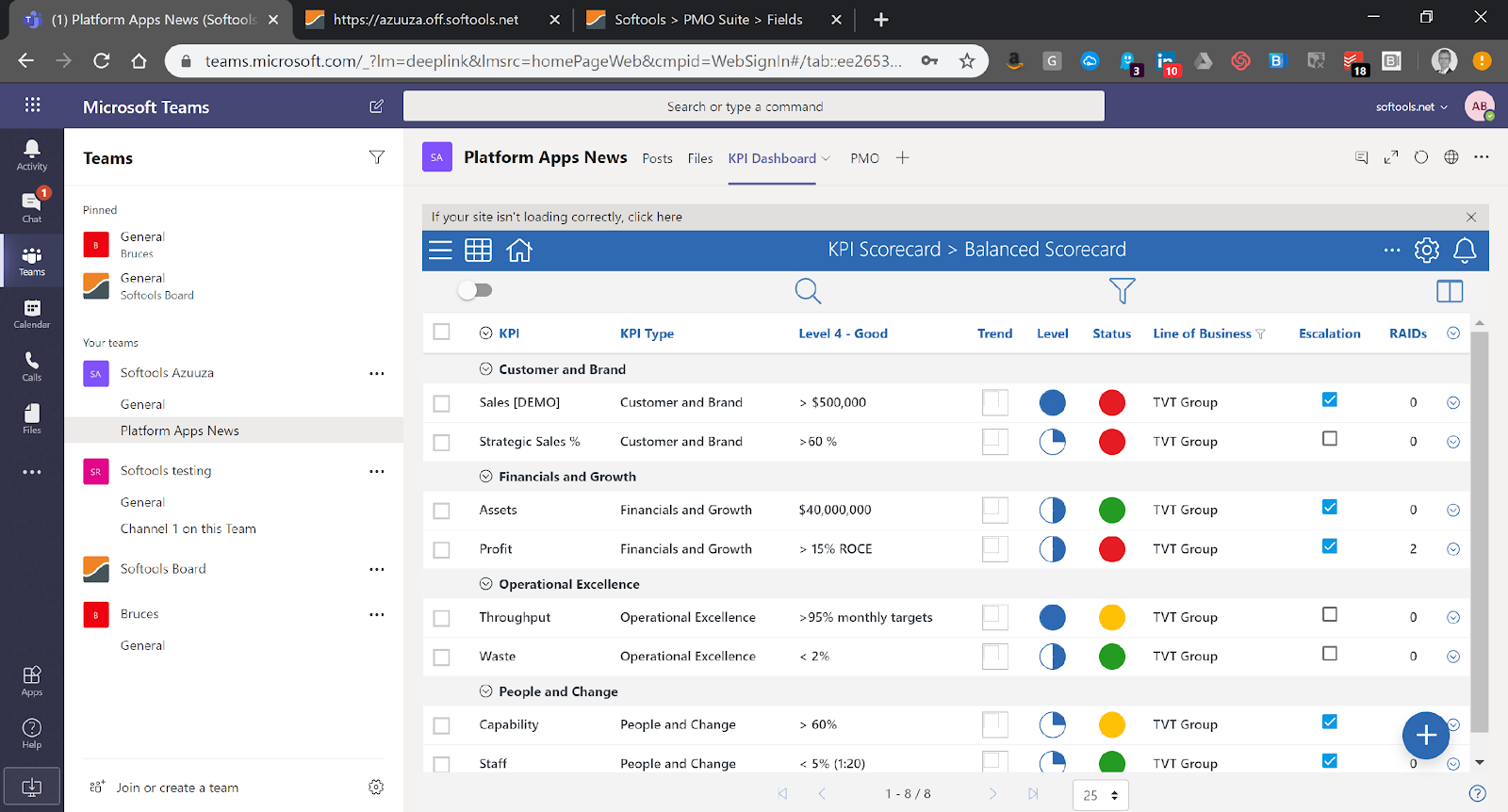
This graphic shows a MS Teams Channel called ‘Platform Apps News’ which in this case is focused on the capture and reporting of Projects grouped by Program across the business. Access to this Channel is restricted to those people in the business who are responsible for planning, managing, and tracking performance for projects across sites and functions – perhaps the PMO or Project Management Office.
The control menu for this Channel at the top has been configured to enable:
-
Access to the PMO wiki
-
A folder for shared project documents – potentially links to SharePoint drive
-
One-click access to the Softools ‘Projects App’
-
Drill-down access to Softools Issues Log / Risk Register related to each KPI
-
A configured Power-BI dashboard pulling data from Softools platform via APIs
Team members will then access this Channel in one of two ways:
1. Via their MS Teams app or web interface
2. Via the Softools App Homepage ‘hotlink’
For more information, email info@softools.net
Please sign in to leave a comment.
Comments
0 comments