Large Deployments - Best Practice

Larger deployments in terms of large apps or large numbers of users need to be planned and managed in more detail. Use this checklist to identify actions and potential risks for your initiative:
- TEAM ADMINISTRATORS: Ensure all teams have a Team-based System Administrator that is trained in setting up Users, and dealing with User onboarding issues
- ACCESS & PERMISSIONS: Create a matrix that shows the Users by Team and be clear on the purpose of the team. For example, is it for just visualizing data (read-only). Create control views of who sees / can do what: a) create a matrix that shows the Apps by Team, and c) create a matrix that shows User and Quick Permissions sets
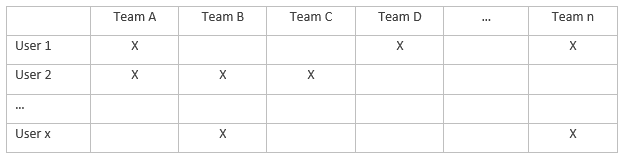
- DATA GOVERNANCE: set up 1 generic user in each team that sees what a User sees. These users can be removed once the set-up is complete.
- EXTERNAL ACCESS: If the Site needs external / public access (e.g. customer or supplier accounts), the Site Administrator will need to set a flag on the site to be GDPR compliant
- STATUS PAGE: Ensure these Administrators are signed up to the status page of Softools to receive status updates
- ONBOARDING: Identify and document all the User Journeys for on-boarding, and conduct a trial-run that reflects each user type and the same number of users
- SUPPORT ISSUES: Document Frequent user support issues with actions to resolve for internal admins. Set up and use the User Issues Log for managing user onboarding or operating issues.
- EXPORT / IMPORT: Test Export / Import for 50,000 records (where data volume is known to be large)
- ARCHIVING & DELETING: Test Archiving and Deleting for 50,000 records. Note - some companies have policies for Archiving data and it should not be mixed with test dummy data (where data volume is known to be large)
- GOVERNANCE: Ensure there is clarity of decision making and governance. Each app should have a defined Executive Sponsor and lead App Builder that clarifies who signs off on apps and when? This should form part of the monthly Governance process.
- APP KPIs: Ensure all apps have clearly defined Key Performance Indicators – what is the app for and what benefits will it deliver. This should be clearly stated in the App Hopper before work is started. By setting the App KPIs upfront any change of scope can always be compared back to the intention of the App. The risk is that on a large App it gets overengineered over time and becomes complex to use
- DEPLOYMENT TIMELINES: Use the 3 generic factors of Scope, Delivery Date and Cost (or app build effort) to provide a schedule of what will be implemented when. On large deployments identify the critical path
- CLEAR SPECIFICATION: Use the Application Hopper in order to calculate the complexity of each app to be built and to capture the top level and detailed scope. With large numbers of users, apps and data volumes, it is even more important to ensure each app is well specced before starting. Break the detailed planning of each app to allow for each stage / gate and sign off required for the R1-3 process
- USER ACCEPTANCE TESTING UAT: For the site overall and for individual apps, there should be a structured UAT process. This should include replicating all key tasks required for Site Settings, User Admin and adding / importing records in each app. Finally, all of the steps that a typically User will follow should be defined and tested
- SSO SINGLE SIGN-ON: If required, this should be set up in line with the critical path well ahead of the User onboarding. Identify the technical point of contact within company IT team for any SSO or integration activity
- BARRIERS TO IMPLEMENTATION: Identify any conflicts that could impact on implementation such as holidays of key personnel, other large projects such as year-end reporting that people involved may need to check out for a week or two to focus on.
- SUPPORT CONTRACT: Ensure you have the right level of support contract (Gold, Silver or Bronze) that will provide second line or technical support including complex app build and training. The more users and apps you have, the more valuable the support contract will be
- CHANGE REQUESTIONS: Set up an internal Change Log app to capture and manage all change requests. However, rather than respond to each one individually, use formal review times and meetings (weekly / monthly) to review the change requests as a whole and batch them together
To learn more visit www.softools.net/support.
Please sign in to leave a comment.
Comments
0 comments